

Blockchain security firm SlowMist has warned developers about malicious GitHub projects disguised as coding exercises. On October 23, the firm said a repository called sol-live contains hidden commands that can install malware through Visual Studio Code (VS Code).
The malware can search for sensitive files, collect browser data and target cryptocurrency wallets. It can also let attackers run commands on an infected computer and monitor information copied to the clipboard.
SlowMist found eight other GitHub repositories with similar settings. However, researchers have not confirmed how many computers were affected or whether the attackers successfully stole any data.
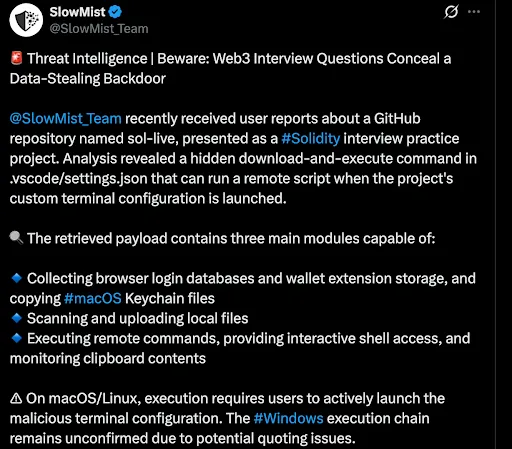
Source: X
Malicious Commands Hidden in Coding Project
The sol-live repository appears to help developers practise Solidity interview questions. Its README lists eight exercises, each expected to take five to 10 minutes.
However, SlowMist found suspicious commands hidden in the project’s .vscode/settings.json file. Developers normally use this file to configure Visual Studio Code.
The attackers used large spaces to hide the commands within the file. They also configured VS Code to hide the .vscode folder from its file explorer, making the code harder to spot.
On macOS and Linux, the attack starts when a developer opens the project’s custom terminal. The commands check whether Node.js and npm are installed before downloading and running a script from a remote server. If Node.js is missing, the commands attempt to install it.
SlowMist could not confirm whether the same method works on Windows. The project attempts to open a hidden PowerShell window, but errors in the command’s quotation marks could prevent it from running.
Researchers studied archived code and saved web responses to understand the malware without executing it. Their analysis identified three main components that collect browser data, search local files and give attackers remote access to an infected computer.
Malware Searches for Browser Data and Crypto Wallets
One component checks data from 13 browsers, including Chrome, Edge, Brave, Opera and Vivaldi. It searches for browsing history, usernames, saved passwords and information entered into online forms.
The malware also targets 41 browser extensions, including cryptocurrency wallets such as MetaMask, Phantom, TronLink and Rabby.
On Mac computers, it attempts to copy Keychain files, which store passwords and other login details. However, copying these files does not automatically give attackers access to their contents.
SlowMist found that the malware’s built-in function could not decrypt saved browser passwords. Researchers also could not confirm whether attackers could unlock wallet extension data or obtain private keys.
The malware also searches folders such as Desktop, Documents and Downloads. It checks cloud storage and software development directories, prioritising files smaller than 5 megabytes before searching other locations. On Windows, it can scan available drives.
Another component allows attackers to read selected files and run commands remotely. It also checks the clipboard every second, potentially exposing sensitive information that users copy, including passwords and wallet addresses.
SlowMist identified eight other repositories with similar settings: code-interview-js, solidity, stockx_v1, javascipt-live, python-live, javascript-live, go-live and tech-assignment.
Researchers only carried out initial checks of these projects’ settings. They did not download and fully analyse every related script, leaving the wider threat unclear.
SlowMist Urges Developers to Check Project Settings
The warning follows other cases in which malicious code and fake cryptocurrency offers have targeted developers and crypto users.
Last year, SlowMist investigated a fake Solana trading bot that reportedly stole cryptocurrency from users who ran its code. The project contained a suspicious package called crypto-layout-utils. After the package was removed from the official npm registry, attackers distributed it through another GitHub source.
In March, security firm OX Security reported a phishing campaign targeting people interested in OpenClaw. Attackers created fake accounts and discussion threads to promote fraudulent $CLAW token rewards.
One message promised $5,000 worth of tokens and directed users to a website resembling the official openclaw[.]ai domain.
The attacks used different methods, but both relied on users trusting something that appeared legitimate. The sol-live project concealed commands in development settings, while the OpenClaw campaign tried to trick users into connecting their wallets to a fake website.
SlowMist advises developers to inspect .vscode/settings.json before opening terminals in unfamiliar projects. They should pay particular attention to unusual terminal settings and commands that download and immediately run code from the internet.
The firm also identified the IP address 172[.]86[.]112[.]107 and several suspicious domains linked to the malware.
Developers who suspect they have run the commands should check for unfamiliar processes, unexpected files and connections to suspicious servers. If an infection is confirmed or cannot be ruled out, they should disconnect the affected computer from the network and investigate what information may have been exposed.
Anyone who believes their crypto wallets or login credentials have been compromised should take action from a trusted device. Depending on the situation, this could include moving funds to newly created wallets and changing affected passwords, exchange API keys, SSH keys and cloud account credentials.
SlowMist stressed that simply downloading or opening a repository does not mean a computer has been infected. Researchers also found no confirmed evidence that the attackers had successfully stolen data from victims.